

ChatGPT feels like a private conversation. You type, it replies, and nobody else seems to be there. That feeling makes it easy to paste in a contract, a bank statement or a password without thinking twice.
But your chats are processed and stored on OpenAI’s servers. This guide explains the five types of information you should never share, plus simple settings and habits that keep you safe.
Why privacy matters when you use ChatGPT
How ChatGPT handles your messages
When you send a message, it leaves your device and is processed on OpenAI’s servers. Depending on your settings, conversations can be stored and may be used to improve future models. Some conversations may also be reviewed by people for safety and quality.
No system is perfectly secure
In March 2023, a bug in ChatGPT briefly showed some users the titles of other users’ chats and exposed some subscribers’ partial payment details. OpenAI fixed it quickly, but it showed that anything you share can be exposed if something goes wrong.
Common myths
- “My chats disappear when I close the tab.” They do not. Chats are saved in your history unless you delete them or use Temporary Chat.
- “It is like talking to myself.” It is not. Your text is processed by a third-party company.
- “The AI will not misuse my data.” The AI itself may not, but data can still be exposed through bugs, breaches or a shared device.
1. Passwords and login details
Never paste a password into ChatGPT, not even to ask whether it is strong.
Do not share:
- Email, banking or social media passwords
- Website admin or app logins
- Wi-Fi and router passwords
- One-time passwords (OTPs) and recovery codes
Why it is risky: passwords stay in your chat history, which can be synced, seen on a shared device, or exposed in a breach. ChatGPT is not a password manager.
Safer option: use a password manager such as Bitwarden, 1Password or your phone’s built-in password manager. You can still ask ChatGPT general questions, like “what makes a strong password?”
2. Financial information
Do not share:
- Debit or credit card numbers, expiry dates and CVVs
- Bank account numbers and IFSC or routing codes
- UPI IDs, UPI PINs or payment app logins
- PAN, tax returns or investment account details
Why it is risky: financial data is a top target for criminals. Even partial details, such as the last four digits of a card with your name and address, can help scammers trick you or your bank.
Safer option: use made-up numbers. Instead of uploading your salary slip, ask: “Assume someone earns ₹60,000 a month as a freelancer. How is their income tax calculated?”
3. Government ID and personal identity details
Do not share:
- Aadhaar, passport, PAN, voter ID or driving licence numbers
- Photos or scans of any ID card
- Your full name, date of birth and address together
Why it is risky: these details together are enough to open fake accounts, apply for loans or commit identity fraud in your name. Unlike a password, you cannot easily change your ID number.
Safer option: if you need help filling in a form, black out personal fields first, or describe the form instead of uploading it.
4. Confidential work and client information
Do not share:
- Client contracts and NDAs
- Internal financial reports and forecasts
- Unreleased product designs or source code
- Employee or HR records
- Unpublished strategies and research
Why it is risky: sharing client or company data with a third-party tool may break your contract, your NDA or data protection laws such as India’s Digital Personal Data Protection Act (DPDP Act) and Europe’s GDPR. In 2023, Samsung restricted staff use of ChatGPT after employees pasted confidential source code into it.
Safer options:
- Replace real names and numbers with placeholders such as “Client A” and “[amount]”
- Ask ChatGPT to improve the structure or wording of a template, then add real details yourself
- Check your company’s AI policy, or use a business AI plan with stronger data protection
5. Medical, legal and very personal information
Be careful with:
- Lab reports, prescriptions and diagnoses
- Legal notices, court papers and case details
- Mental health, relationship or family details you would not want stored
Why it is risky: these details are stored like any other chat. Conversations with an AI are not protected by doctor-patient or lawyer-client confidentiality.
Safer option: ask general questions (“what does a high HbA1c result usually mean?”) and use ChatGPT to prepare questions for your doctor or lawyer. For your own situation, speak to a qualified professional.
Other details to think twice about
- Home address: combined with other details, it can enable stalking or scams.
- Phone number: can be used in SIM-swap scams that bypass two-factor authentication.
- Private photos: images can contain location data and other identifying details.
- Children’s information: avoid sharing a child’s name, school, photos or location.
ChatGPT privacy settings to check
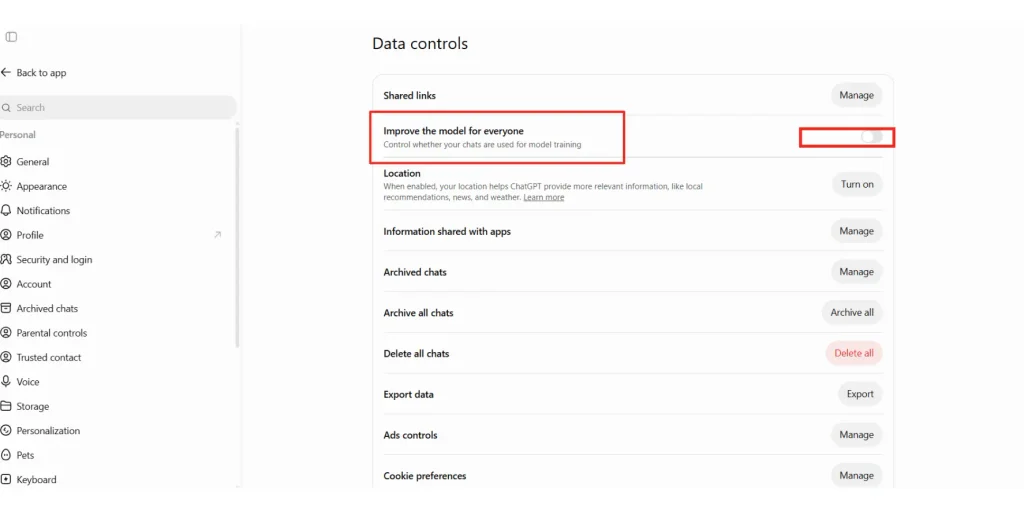
- Turn off model training. Go to Settings → Data controls and switch off Improve the model for everyone.
- Use Temporary Chat for sensitive topics. Temporary chats do not appear in your history, are not used to train models, and are not remembered by Memory. OpenAI may keep a copy for up to 30 days for safety.
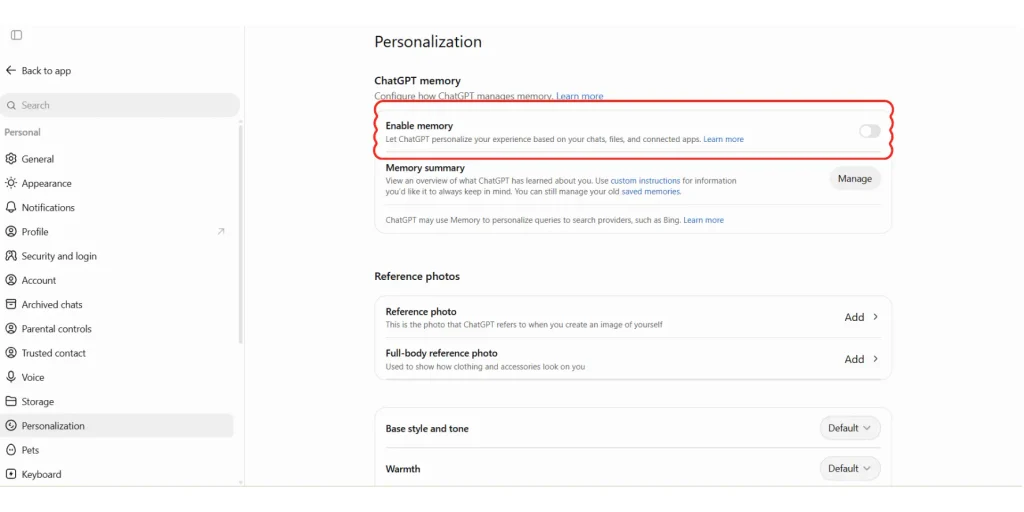
- Review Memory. Go to Settings → Personalization → Memory to see and delete what ChatGPT remembers about you, or turn Memory off.
- Delete old chats. You can delete single chats from the sidebar, or all chats from Settings → General.
Menu names can change between app updates, so search Settings if an option has moved.
How to use ChatGPT safely: a quick checklist
- Would I be comfortable if this message were posted publicly?
- Have I removed names, ID numbers and account numbers?
- Have I replaced real figures with approximate or made-up ones?
- Am I using Temporary Chat for anything sensitive?
- Is model training turned off in Data controls?
Common mistakes
- Pasting whole documents. Full PDFs and email threads often contain details you did not notice. Trim them first.
- Sharing client details. Client information belongs to the client, not to you.
- Using real data in “examples.” A sample email with a real name and invoice amount is real data.
- Assuming chats are private by default. Check your settings first.
Frequently asked questions
Does ChatGPT save my conversations?
Yes, by default chats are saved in your history until you delete them. Temporary Chat conversations are not saved to your history.
Can OpenAI employees read my chats?
OpenAI says a limited number of authorised staff may review some conversations, for example to investigate abuse or improve safety. Avoid sharing anything you would not want a person to see.
Is it safe to upload documents to ChatGPT?
It is safe for public or non-sensitive documents. Remove personal, financial and confidential information before uploading anything else.
Is ChatGPT safe for business use?
Yes, if your team follows clear rules about what not to share. For sensitive work, business plans such as ChatGPT Business or Enterprise do not use your data for training by default.
Does deleting a chat remove it completely?
Deleted chats disappear from your history straight away. OpenAI says it removes them from its systems within about 30 days, unless it must keep them for legal or security reasons.
Key takeaways
- Never share passwords, OTPs or PINs.
- Keep card, bank and UPI details out of chats.
- Protect Aadhaar, PAN, passport and other ID numbers.
- Anonymise client and company information.
- Use professionals for medical and legal matters.
- Turn off model training and use Temporary Chat for sensitive topics.
Conclusion
ChatGPT is a powerful tool, but it is not a safe for your secrets. A simple rule keeps you protected: if you would not post it on a public notice board, do not paste it into an AI chat.
Anonymise what you share, check your settings once, and you can keep using ChatGPT for writing, research and planning with peace of mind.