
ChatGPT can help you plan, draft and repurpose content much faster. But it works best as a co-writer, not a replacement for your knowledge, strategy and voice.
This guide gives you a step-by-step workflow, copy-paste prompts for every stage, and the mistakes to avoid so your content stays accurate and genuinely useful.
What ChatGPT does well in content marketing
ChatGPT is an AI assistant that writes and edits text from your instructions, called prompts. Marketers use it to speed up:
- Topic ideas and content calendars
- Blog outlines and first drafts
- Meta titles, descriptions and FAQs
- Social media posts and captions
- Email sequences and subject lines
- Ad copy variations
It speeds up drafting, but it does not replace strategy, research, real examples or expert judgment.
Benefits
- Saves time on first drafts and repetitive formats
- Beats writer’s block by giving you something to edit
- Lowers costs for small teams
- Makes repurposing easy across blog, social and email
Most teams see the biggest gains after they learn to write clear, specific prompts.
Step-by-step workflow
Step 1: Generate topic ideas
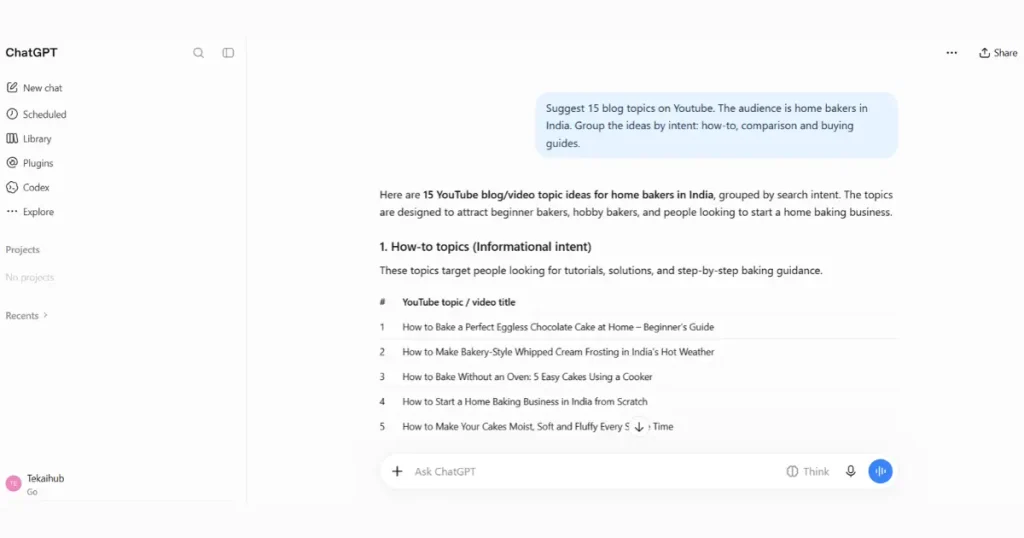
Tell ChatGPT your niche, audience and goal.
Suggest 15 blog topics for a small online bakery’s blog. The audience is home bakers in India. Group the ideas by intent: how-to, comparison and buying guides.
Step 2: Support keyword research
Use ChatGPT to brainstorm keyword ideas and questions, then check search volume and difficulty in a real SEO tool such as Google Keyword Planner or Semrush.
List 10 long-tail keyword ideas for “[topic]” with informational intent, and the questions people are likely to ask about it.
Step 3: Create an outline
Create a detailed outline for an article on [topic] for beginners, with H2 and H3 headings. Include an FAQ section with five questions.
Then edit the outline. Replace generic sections with angles only you or your brand can offer.
Step 4: Draft section by section
Draft one section at a time instead of the whole article. Give clear instructions on length, tone and audience.
Write a 250-word introduction for an article on [topic] for small business owners. Friendly, expert tone. Use the keyword “[keyword]” naturally in the first 100 words.
Treat every draft as a starting point. Add your own examples, screenshots and opinions.
Step 5: Optimise for SEO
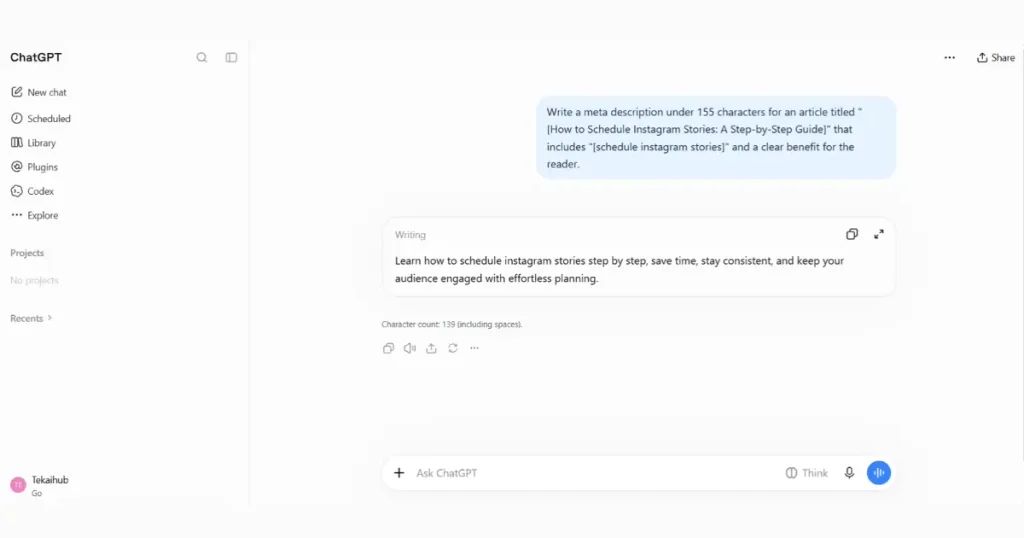
Write a meta description under 155 characters for an article titled “[title]” that includes “[keyword]” and a clear benefit for the reader.
Suggest five FAQs people search for about [topic], with two-sentence answers.
Step 6: Repurpose for social media
Turn this article section into three LinkedIn posts, each with a different opening hook and a question at the end: [paste section]
Write five Instagram caption options for this blog post, each under 150 words, with one clear call to action: [paste summary]
Step 7: Write emails
Write a three-email welcome sequence for new subscribers to [brand]. Each email should share one useful tip and end with one clear call to action. Avoid filler phrases.
Give me 10 subject line options for this email, under 50 characters each: [paste email]
Prompt library
| Task | Prompt |
| Blog titles | Write five SEO titles for [topic] using “[keyword],” each under 60 characters. |
| Content calendar | Create a four-week content calendar for [brand] with two blog posts and five social posts per week. |
| Product description | Write a 100-word product description for [product] focused on benefits for [audience]. |
| Ad copy | Write three Facebook ad variations for [offer], each with a different hook. |
| Brand voice rewrite | Rewrite this draft in our brand voice: [describe voice]. Keep it under 200 words. |
| Fact-check list | List every factual claim in this draft that needs a source before publishing. |
The editing checklist (do not skip this)
Before you publish anything ChatGPT helped write:
- Check every fact, number, date, price and name against a reliable source
- Remove generic filler and repeated points
- Add at least one real example, screenshot or piece of original data
- Make sure it sounds like your brand
- Read it aloud once
- Confirm it fully answers what the searcher wants
Common mistakes
- Publishing without editing. Readers notice, and it hurts trust.
- Vague prompts. Add audience, tone, length and format.
- Not fact-checking. ChatGPT can confidently state wrong statistics, prices and dates.
- Ignoring brand voice. Every post starts to sound the same.
- Keyword stuffing. Write for people first.
- Inventing experience. Never ask ChatGPT to make up personal stories, customer results or testimonials. Use real examples or clearly labelled hypothetical ones.
ChatGPT and SEO
A simple workflow that works:
- Research keywords in an SEO tool
- Build the outline with ChatGPT, then edit it
- Draft section by section
- Add your own examples, data and screenshots
- Write metadata and FAQs
- Fact-check and edit
- Format with clear headings, short paragraphs and internal links
Google’s guidance focuses on helpful, reliable, people-first content. AI-assisted content is fine when it adds real value; mass-produced content made mainly to rank is not.
Limitations to know
- It may not know about recent changes unless web search is turned on.
- It cannot do original research, interviews or analytics reviews.
- It can be confidently wrong.
- Its default tone can be generic.
Tools to use alongside ChatGPT
| Purpose | Tools |
| Keyword research | Google Keyword Planner, Semrush, Ahrefs |
| SEO optimisation | Rank Math, Yoast, Surfer |
| Editing | Grammarly, Hemingway Editor |
| Design | Canva |
| Scheduling | Buffer, Meta Business Suite |
The future of AI in content marketing
- Tools that create text, images and video from one brief
- AI search summaries changing how content gets found
- More personalised content for different readers
- Growth in audio and video formats
Frequently asked questions
Can ChatGPT replace content writers?
No. It speeds up drafting, but it lacks real experience, original opinions and deep audience understanding. It works best as a co-writer.
Is ChatGPT good for SEO?
It is good for outlines, metadata, FAQs and structure. You still need SEO tools for keyword data and rank tracking.
How accurate is ChatGPT?
It is often accurate but can be confidently wrong, especially on statistics, prices and recent events. Always fact-check before publishing.
Does Google penalise AI content?
Google does not penalise content just because AI helped write it. It does act against low-quality content mass-produced to manipulate rankings.
Conclusion
ChatGPT is a powerful assistant for content marketing when you use it for ideas, structure and first drafts, and bring your own expertise, examples and editing to the final piece.
Start with one step from this guide this week, such as outlines or meta descriptions, and measure how much time it saves you.